
Frequently Asked Questions
General
What is Carmen Cloud?
Carmen Cloud is more than a professional number plate recognition: it is a complete vehicle identification service with automatic vehicle brand, model and color recognition. All these features come with the advantages of the SaaS (software as a service) / cloud model, offering a fully scalable performance for your project – no matter if your need is only a dozen recognitions a day, or even thousands per hour: the cloud makes sure to serve reliable results anytime and anywhere.
This system is powered by our well-known recognition engine, Carmen® bringing its exceptional performance: more than 33,000 license plate types of coverage and outstanding recognition rate.
Who should use Carmen Cloud?
Carmen Cloud is designed for software developer companies, software integrators and installer companies who want to add license plate recognition and vehicle identification to their solution quickly.
Check out how many application you can build with our service
How do I start using Carmen Cloud?
You can easily get started from the Cloud Dashboard. Once you have created an account, you can manage workspaces, API keys, subscriptions, prepaid credits, usage, storage and hooks from one place.
Which platforms does Carmen Cloud support?
Our service is built upon REST API that is programming language independent, anything that can initiate a TCP / IP connection can be used.
REST API can be easily called from a programming environment such as Java, JavaScript, PHP, C ++, C #, Python, Swift or even Curl even without deeper programming knowledge. It is also possible to use the JAVA or C++ SDK which makes integration even easier by using objects.
What is the minimum technical knowledge with which I can start using Carmen Cloud?
You need to know the business logic of your own solution and the programming language of your application. You must be able to use the REST API to invoke the service.
Why choose Adaptive Recognition’s Carmen Cloud over your competitor
Adaptive Recognition’s great differentiator is our 30 years of know-how. We started our first projects back in the 90s and our license plate recognition engine that was getting the job done even back then, has only been perfected since that time, achieving a level of performance today that is difficult to outdo.
This company legacy also allowed us to process more images towards the development of our technology than any other player could possibly perform in a much shorter time, allowing us to fine-tune speed, accuracy and geographical coverage to a level we are really proud of and which even complies with international governmental requirements.
Start Using the Service
Once I sign up, what happens next?
You will receive a code to confirm your registration by email and activate your account. Log in to your Carmen Cloud Dashboard and walk through the documentation.
What countries do you support?
We support countries all over the world with characters in many different languages. In the Cloud Dashboard and API references we support the following countries: see the documentation
What vehicle’s attribute does Carmen Cloud provide after processing?
Carmen Cloud returns license plate number, confidence level, make and color of any vehicle that is detected in the image. Please see the Vehicle API documentation for the details.
How quickly does Carmen Cloud return processed results?
In optimal conditions and if you request only the ANPR data it is 80ms on the node sides! Since we are talking about network communication, it can be up to a few seconds depending on the current state of your network and the sent image size (please keep it under 200kbyte).
We do not have experience in integrating an ANPR or vehicle identification software. How complicated is it?
What makes our service easy to use is that it does not require any classic integration skills whatsoever. That means no special expertise is needed: with intermediate, general IT skills, anybody can perform the setup. That means you need to know how to use REST API and understand the JSON format.
What languages do you support?
The Carmen Cloud REST API can be accessed in any language. To learn about the REST API, more information can be found in the documentation and on GitHub.
Can I trial Carmen Cloud for free before subscribing it?
YES! Carmen Cloud offers fully functional trials for 2500 transactions (lookups). When your trial expires, you can continue using Carmen Cloud by subscribing to a monthly plan or by purchasing prepaid Vehicle API credits from the Cloud Dashboard.
Data Usage
I am not comfortable with sharing my data with a 3rd party or sending it into a cloud. How are the data managed?
No data is stored in Carmen Cloud unless you explicitly request it (see the Cloud Dashboard Storage & Hooks page). Your data are used only for the recognition process, temporarily kept in the AWS Lambda instances memory before being entirely "forgotten". Both, images submitted to the cloud and the data sent back to your system, are secured with SSL encryption. All data are managed according to EU’s GDPR regulation. Please review our Data Processing Agreement and our Privacy Policy.
Does Carmen Cloud use the image I send to the Carmen Cloud API?
Carmen Cloud does not use any of your content (such as images) for any purpose except to provide you with the Carmen Cloud.
Will Carmen Cloud share the image I send to the Carmen Cloud API?
We will not make the image that you send available to the public, or share it with anyone else, except as necessary to provide the Carmen Cloud services. For example, we need to use a third-party vendor (AWS services) to help us provide some aspect of our services, such as transmit and process of data, who will be under appropriate security and confidentiality contractual obligations. We will not share the image that you send with any other parties, or make it public, for any other purpose. Please review our Data Processing Agreement.
Will the image I send to the Carmen Cloud API, the results or other information about the request itself, be stored on Carmen Cloud servers? If so, how long and where is the information kept, and do I have access to it?
When you send an image to Carmen Cloud API, we must store that image for a short period of time in order to perform the recognition and return the results to you. For online (immediate response) operations, the image data is processed in memory and not persisted to disk.
How does Carmen Cloud protect and ensure the security of the data I send to Carmen Cloud API?
We use HTTPS channel for communication and AWS security services.
Does Carmen Cloud claim ownership of the content I send in the request to Carmen Cloud API?
Carmen Cloud does not claim any ownership in any of the content (including images) that you transmit to the Carmen Cloud API.
Pricing
Some software solutions start charging money when their trial session expires. Can you confirm that my company will not be charged?
Yes, the free trial does not require payment information. Once you use up the trial lookups, you can continue with a monthly plan or buy prepaid Vehicle API credits from the Cloud Dashboard. The trial is intended to validate recognition quality and confirm that the images produced by your camera are suitable for cloud processing.
How much does Carmen Cloud cost?
Carmen Cloud offers several monthly lookup packages instead of a single fixed plan:
- Micro – 25,000 lookups / month
- Starter – 100,000 lookups / month
- Growth – 250,000 lookups / month
- Professional – 500,000 lookups / month
Larger custom packages are also available. For high-volume or custom commercial requirements, please contact sales.
Exact billing details may differ by billing region. Customers on the American continent are served through the US Stripe account, while customers in other regions are served through the global Stripe account.
If you are not ready for a monthly Vehicle API subscription, you can also buy prepaid credits. One credit unit contains 1,000 lookups. You can buy 10-999 units in a single purchase, and prepaid credits remain available until they are used.
Do your prices include taxes?
Except as otherwise noted, our prices are exclusive of applicable taxes and duties, including VAT and applicable sales tax.
Does Carmen Cloud charge me for failed queries?
We only charge for HTTP 200 and 400 status codes.
The HTTP 200 OK success status response code indicates that the request has succeeded. The response will contain a result in JSON format.
The HTTP 400 is an Invalid Image error message. This means that the size (the image is less than 10MB) and format (jpeg, bmp, etc.) of the image was correct, but the vehicle and license plate are not recognizable on it by the service. That is, the service was executed and the algorithm and resources processed the image but we could not provide a usable result.
To prevent this error happening, in the testing phase, please use our demo application on the Cloud Dashboard and use images generated by your camera.
What happens if I run out of pre-purchased plan?
Carmen Cloud notifies you when you approach your monthly subscription allowance. If you have an active subscription, subscription and overage billing are primary. Prepaid Vehicle API credits are consumed only when no active subscription covers the request.
If you do not have an active monthly subscription, successful Vehicle API calls can consume your prepaid credits until they run out. You can top up credits from the Cloud Dashboard at any time.
My business logic is that my solution needs to identify multiple vehicles from one image. How many lookups will be deducted in this case?
One lookup is always deducted per still image for processing.
For example, if you want us to return a max. five license plates per one image, set the optional parameter maxreads to five and if we find two, we subtract three lookups. If, on the other hand, we find all five plates that you requested, we will only deduct five lookups because we are no longer trying sixth time because of the value of maxreads.
By default, maxreads are always 1, recognition is 0 or 1.
Input Image
Why can't Carmen Cloud read this image?
The recognition algorithm behind the Carmen Cloud (a neural network) was taught to images taken with various cameras containing 40+ million different license plates in all around the world. The boundaries of recognition capabilities are extremely wide, better than what the human eye can recognize. However, if the attributes of the image containing the vehicle and license plate provided by your camera are outside the training data set, the neural network may not be able to see the vehicle and license plate. To avoid this, the client side and the recognition service must be synchronized. How? Go to the demo of Cloud Dashboard and upload some typical images. If the returned results are good then there is nothing to do, if not, then please see the camera settings and input image guide description of our how-to-use subpage.
Why is the quality of the input image important?
The characteristics of the input image determine the quality of the ANPR and MMR service, i.e., speed, accuracy, low False Positive rate etc.
What is a good input image?
First, including the vehicle and the license plate, which is clearly visible, i.e. distortion-free, contrasting, legible characters, etc.
We write about it in the Vehicle API input image guide, or if you want to read more about it, look at the following document: link
Also, what is a good image? Small sized (around 100kbyte) i.e. compressed image format. Why? Because we are talking about a network service, i.e. small image = fast network communication and fast processing. In this way we can achieve 80ms processing time values.
It is not always easy to take small-sized and good ANPR images if we have to solve the task with a surveillance camera or a mobile phone. In this case, the client-side image selection is an important task.
Can Carmen Cloud recognize license plates on images that the human eye cannot?
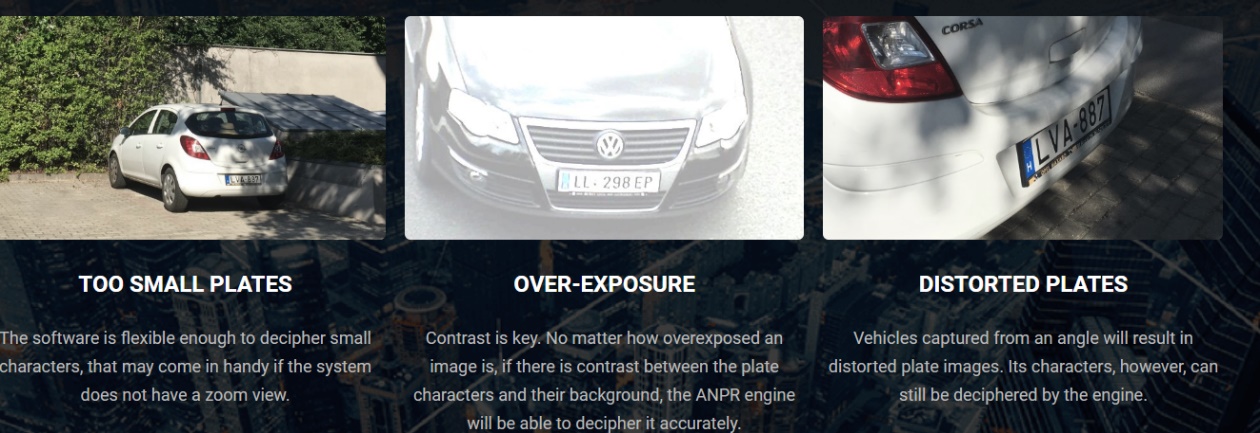
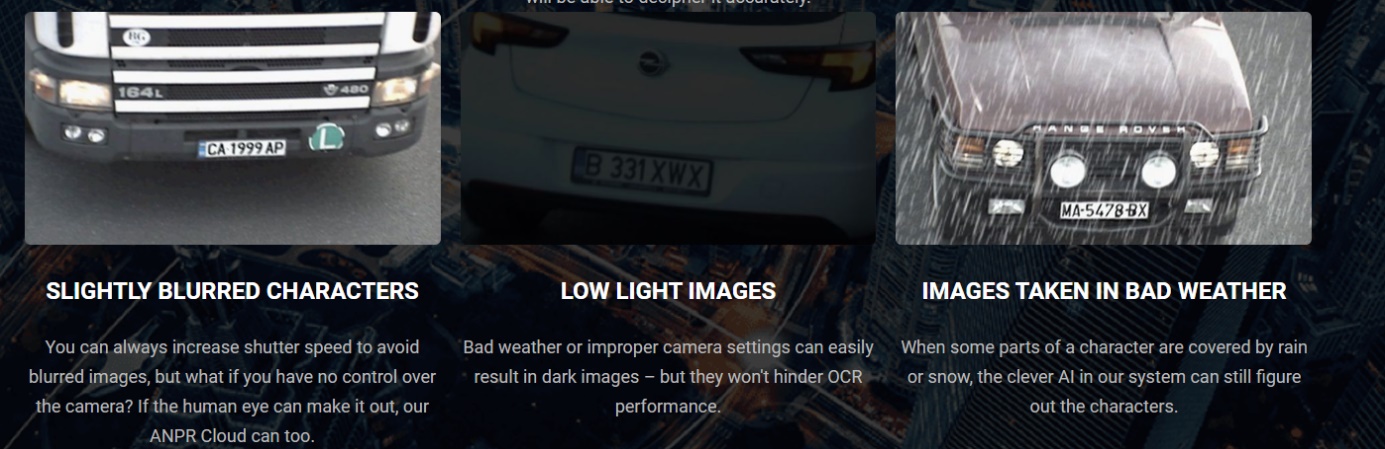
The best approach is to test your ’hard-to-read images’ using the Cloud Dashboard demo application.
The challenges below will be solved by our recognition engines:
Client-Side Integration
What support can I get to integrate the service call into my client-side application?
Calling the service is REST-based and we give a step by step guide in the Vehicle API getting started tutorial. REST-based http calls can be integrated into any programming language environment. We provide sample code in Curl, JavaScript, and Python, and also provide client side SDKs in Java, JavaScript (TypeScript), and Python that will help you building up the client-side implementation. The Curl and JavaScript code elements can be found in the documentation, while the SDKs have been uploaded to GitHub.
What is the REST API and what do I need to do with it?
Representational state transfer (REST) is a software architectural style that defines a set of constraints to be used for creating Web services. more
To learn how to use it please visit stackoverflow, best practices
The service returns an error message. What to do? What exactly are these error messages?
The service is based on the request to response structure, i.e. we call the service with http post, the input data is wrapped in JSON data format and Carmen Cloud sends a response. Upon successful processing (HTTP 200) the response is packaged in JSON data format, upon unsuccessful processing, it sends a HTTP error status that must be handled by the client-side implementation.
What are these messages and where can I find them?
You can find the http status codes on the Vehicle API subpage by clicking on Carmen Cloud API field:

-
Input Image issues: HTTP 400, 413 error messages. In this case, please check the input image guide and correct the camera settings or the image preselection module in your application.
-
API key issues: HTTP 401, 403 In this case, check the Cloud Dashboard for a valid API key and update your application.

-
You have run out of free lookups or credits: HTTP 429. In this case, please subscribe to a plan or buy prepaid Vehicle API credits from the Cloud Dashboard.
-
Network issues: HTTP 408, 500, 503, 504. Since we are talking about a network service, there may be server problems. In this case, no processing will take place and, of course, no lookup will be deducted. On our side, we have minimized this risk by solving all infrastructure elements with AWS services and AWS availability is 99.9999%.
These status messages must also be handled on the client side. We recommend that exception handling be considered.