
Getting Started
Learn how to read license plates (ANPR/ALPR) and recognize vehicle make, model and color (MMR) using the Carmen Cloud Vehicle API in less than 5 minutes!
Register to get your free lookups
First, if you haven't already done so, you need to register from the Cloud Dashboard. The free tier provides 2500 lookups which should be enough for running some tests.
Get your API key
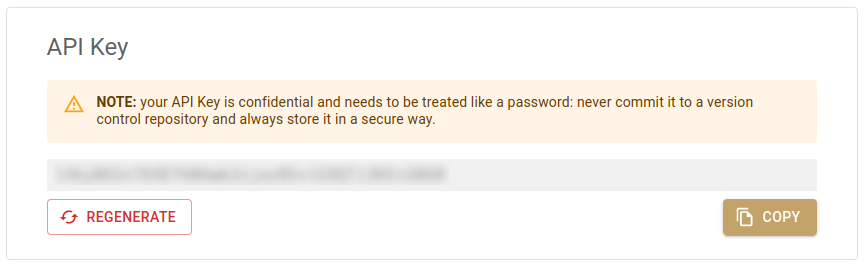
After registering, log in to the Cloud Dashboard, scroll down until you see the box below, and copy your API key.
How authentication works
Recognition requests are authenticated with the API key itself: send it in the
X-Api-Key header of each request, as shown below. That is all you need for
this tutorial.
Everything beyond recognition — managing API keys, usage reports, event
storage and webhooks — is done via the
Carmen Cloud API, which instead expects a short-lived
bearer token in the Authorization header. You get a token by exchanging
your API key at the token endpoint; see the
Authentication reference for details.
Find a test image
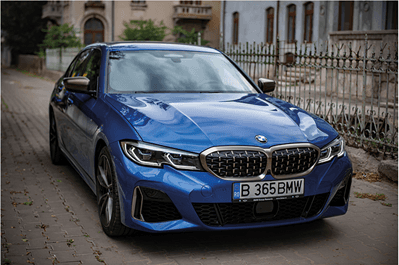
Find an image of a vehicle with the license plate visible, or download this one for a quick test:
Determine the region and country
Choose the region and expected location of the vehicle. For the image above, the region is eur (Europe) and the location is ROU (Romania).
Valid values for the region are:
- Europe:
eur - Africa:
afr - Australia:
aus - North America:
nam - Central America:
cam - South America:
sam - East Asia:
eas - Central Asia:
cas - South Asia:
sas - Middle East:
me
For a list of all possible locations, please refer to this table.
Send a request to the Vehicle API
Using your tool of choice, send the following POST request to the URL https://api.carmencloud.com/vehicle/<region> (substitute the region you have chosen in the previous section):
- Header:
Content-Type: multipart/form-data - Header:
X-Api-Key: [YOUR_API_KEY] - Field
image: the test image with its appropriate content type (e.g.image/jpegorimage/png) - Field
location: the location - Field
service:anpr,mmr
For example, using the test image linked before:
- cURL
- Python
- JavaScript
curl -X POST 'https://api.carmencloud.com/vehicle/eur' \
-H 'X-Api-Key: [YOUR_API_KEY]' \
-H 'Content-Type: multipart/form-data' \
-F 'service=anpr,mmr' \
-F 'location=ROU' \
-F "image=@vehicle-api-test-image.png;type=image/jpeg"
import requests

with open("vehicle-api-test-image.png", "rb") as image:
    response = requests.post(
        "https://api.carmencloud.com/vehicle/eur",
        headers={"X-Api-Key": "[YOUR_API_KEY]"},
        data={"service": "anpr,mmr", "location": "ROU"},
        files={"image": ("vehicle-api-test-image.png", image, "image/jpeg")},
    )

response.raise_for_status()
print(response.json())
// Node.js 18+ (fetch, FormData and Blob are built in)
import { readFile } from "node:fs/promises";

const form = new FormData();
form.append("service", "anpr,mmr");
form.append("location", "ROU");
form.append(
  "image",
  new Blob([await readFile("vehicle-api-test-image.png")], { type: "image/jpeg" }),
  "vehicle-api-test-image.png"
);

const response = await fetch("https://api.carmencloud.com/vehicle/eur", {
  method: "POST",
  headers: { "X-Api-Key": "[YOUR_API_KEY]" },
  body: form,
});

if (!response.ok) throw new Error(`HTTP ${response.status}`);
console.log(await response.json());
Prefer a ready-made client? Our SDKs wrap these calls for you: the
Node.js client (@adaptive-recognition/carmen-cloud-client)
and the Python package carmen-cloud-client (pip install carmen-cloud-client).
The homepage has copy-paste examples in
further languages.
The response will contain the make, model and color of the vehicle and the text of its license plate (truncated for brevity):
{
  "data": {
    "vehicles": [
      {
        "plate": {
          "found": true,
          "country": "ROU",
          "plateTypeConfidence": 47,
          "positionConfidence": 100,
          "plateChars": [ ... ],
          "unicodeText": "B365BMW",
          "separatedText": "B 365 BMW",
          "engine": "cmanpr-7.3.12.116 : rou_local",
          "proctime": 73,
          "confidence": 33,
          "plateROI": { ... },
          "plateType": 110026
        },
        "mmr": {
          "engine": "mmr-7.3.4.24 : mmr-eur",
          "found": true,
          "proctime": 87,
          "category": "CAR",
          "categoryConfidence": 62,
          "color": {
            "r": 0,
            "g": 0,
            "b": 255
          },
          "colorConfidence": 95,
          "make": "BMW",
          "model": "5",
          "makeConfidence": 100,
          "modelConfidence": 62,
          "heading": "frontal",
          "headingConfidence": 99
        },
        "bounds": { ... }
      }
    ]
  },
  "nodename": "74f2fb5c-8be8-4a2b-bcfb-e0708eacfd04 ([380]e1a68a7ba39f4ed4b128b1fc5b17aecb)",
  "nodetime": 250,
  "version": "1.3"
}