Confirming the Subscription
If you have successfully registered the Hook using either method in the previous section, the test web server must already have logged the subscription request. Switch to the terminal and check the logs.
INFO:root:============================
INFO:root:POST request,
Path: /
Headers:
X-Forwarded-For: 54.239.6.9
Host: <your-host>
X-Forwarded-Proto: http
Connection: close
Content-Length: 1738
x-amz-sns-message-type: SubscriptionConfirmation
x-amz-sns-message-id: <xxxxx>
x-amz-sns-topic-arn: arn:aws:sns:eu-central-1:328016752712:<your-topic-name>
Content-Type: text/plain; charset=UTF-8
User-Agent: Amazon Simple Notification Service Agent
Accept-Encoding: gzip,deflate


Body:
{
  "Type" : "SubscriptionConfirmation",
  "MessageId" : "<xxxxx>",
  "Token" : "<single-use-token>",
  "TopicArn" : "arn:aws:sns:eu-central-1:328016752712:<your-topic-name>",
  "Message" : "You have chosen to subscribe to the topic arn:aws:sns:eu-central-1:328016752712:<your-topic-name>.\nTo confirm the subscription, visit the SubscribeURL included in this message.",
  "SubscribeURL" : "https://sns.eu-central-1.amazonaws.com/?Action=ConfirmSubscription&TopicArn=arn:aws:sns:eu-central-1:328016752712:<your-topic-name>&Token=<single-use-token>",
  "Timestamp" : "2022-10-20T13:42:33.851Z",
  "SignatureVersion" : "1",
  "Signature" : "<signature>",
  "SigningCertURL" : "https://sns.eu-central-1.amazonaws.com/SimpleNotificationService-56e67fcb41f6fec09b0196692625d385.pem"
}

127.0.0.1 - - [20/Oct/2022 13:42:33] "POST / HTTP/1.0" 200 -
In production applications we recommend performing the following security checks before confirming subscription requests:
- The topic name (the last colon-separated part of the
TopicArnin the subscription request body) must match thetopicNameproperty returned by the API after registering the hook. - The digital signature included in the
Signatureproperty must be valid.- Signature verification is documented in detail here by AWS.
- The most secure way to implement verification is to use the official client library for your programming language provided by AWS.
The purpose of this tutorial is to show the simplest possible way to implement a Hook, so we will skip the verification steps detailed above.
Copy the SubscribeURL property of the confirmation request and either paste it into your browser's address bar or call it using cURL:
curl https://sns.eu-central-1.amazonaws.com/?Action=ConfirmSubscription&TopicArn=arn:aws:sns:eu-central-1:328016752712:<your-topic-name>&Token=<single-use-token>
The response should be an XML document with the details of the subscription:
<ConfirmSubscriptionResponse xmlns="http://sns.amazonaws.com/doc/2010-03-31/">
    <ConfirmSubscriptionResult>
        <SubscriptionArn>arn:aws:sns:eu-central-1:328016752712:<your-topic-name>:<your-subscription-id></SubscriptionArn>
    </ConfirmSubscriptionResult>
    <ResponseMetadata>
        <RequestId><xxxxx></RequestId>
    </ResponseMetadata>
</ConfirmSubscriptionResponse>
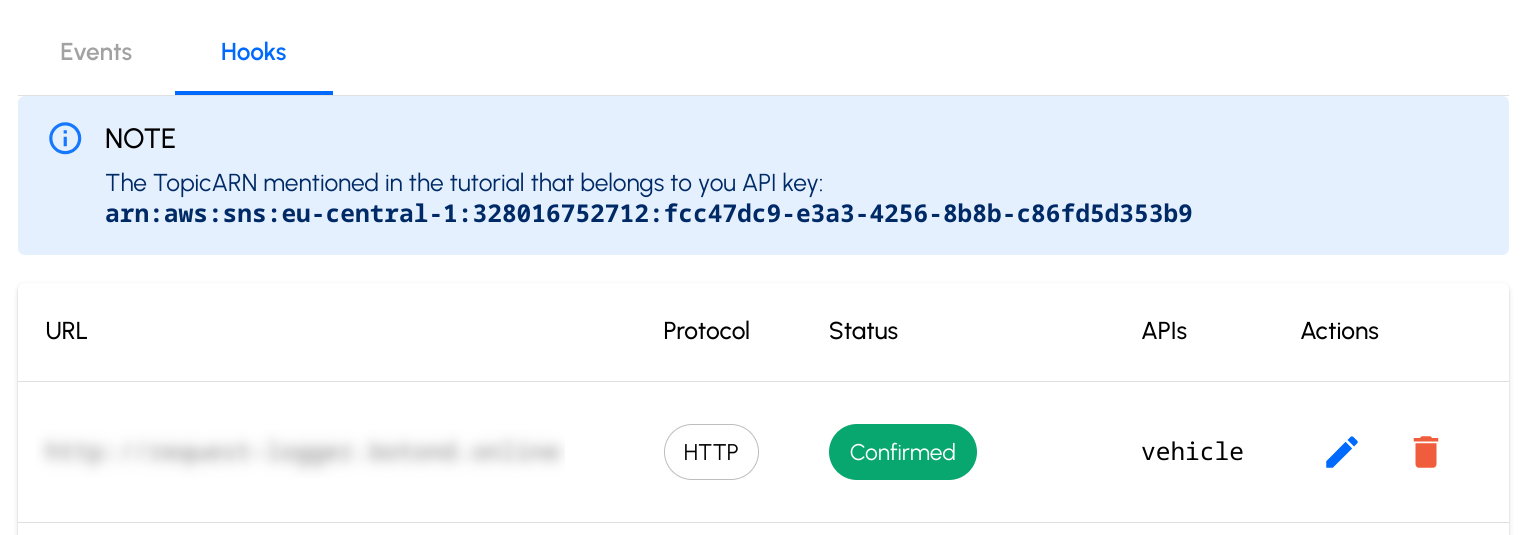
After successful confirmation, the console should list the hook as confirmed: